
AI
OpenAI Could Announce Its ChatGPT-Powered Search Engine on Monday
[Update May 13, 2024, 2:30 p.m.: Turns out it wasn't a search engine at all, but a...

Do you sometimes miss the doorbell, or a knock at the door, because you're wearing headphones? Not everyone knows this but there's a built-in feature for recognizing sounds in the iPhone settings. By default this feature, which is in the accessibility section of System Settings, gives you a notification every time a given sound is heard, but you can take things even further by triggering a Shortcut.
Note that Apple's documentation clearly states this feature shouldn't be relied on "to recognize sounds in circumstances where you may be harmed or injured, in high-risk or emergency situations, or for navigation." If the stakes are lower than that, though, it might keep you from missing something.
To get started open System Settings and head to Accessibility > Sound Recognition. Turn the feature on.

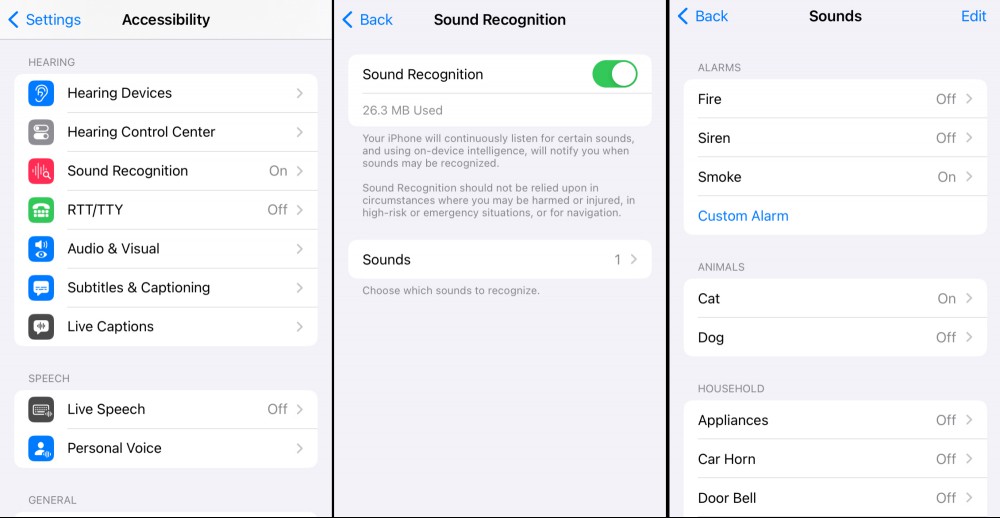
From here you can toggle which sounds you want the phone to passively listen for. The default list includes alarms, pets, and various household sounds like a kettle boiling or a knock at the door. You can enable sounds and get a notification every time your iPhone "notices" the sound. You can also train your phone to recognize your specific appliances and alarms. The process, which is guided, means triggering the alarm multiple times so your phone can learn to recognize it.
As I mentioned before, you can also use this feature to trigger Apple Shortcuts. The only limit here is the shortcut you manage to build. You could, for example, keep track of how many times you boil a kettle of water every day, or how often the neighbor's dog barks. Or you could, like I did, just set your phone to talk to you every time a fairly common thing happens because you think that's funny.
To get started open the Shortcuts application on your phone and open the Automations tab. Scroll down to near the bottom and you'll see Sound Recognition. You can choose which sound triggers the automation and which shortcut you want to run.
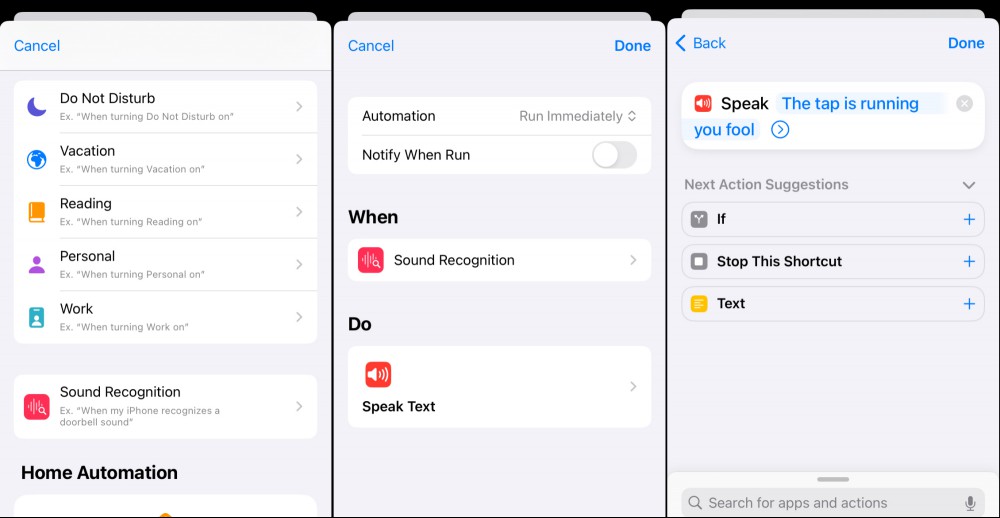
Note that you can add as many automations as you like, meaning you could trigger different shortcuts for different sounds. Use this new power wisely.
[Update May 13, 2024, 2:30 p.m.: Turns out it wasn't a search engine at all, but a...

In addition to being visually stunning, the appeal of the Northern Lights also has...

Against all good sense, my old ass has been getting into mountain biking over the ...
Apple is currently behind on the generative AI game, but that could all change soo...

I’m hardly a noob when it comes to smoking meat on the grill, but I’ve never o...

Apple's WWDC 2024 is nearly here. In just a matter of days, we'll get our first lo...
Comments on "How to Get Your iPhone to ‘Hear’ the Doorbell, Your Pet, and Other Important Sounds" :